Skip to Content

PRE-TEENS (AGES 9–12)

 Igniting Curiosity through AI & Creative Coding

WHY REGISTER

Our Pre-Teens Cohort is a specialized, high-engagement track designed specifically for pre-teens. We take the complex worlds of Artificial Intelligence, coding, and synthetic media and transform them into gamified, hands-on creative adventures. 

01

Creative Empowerment Transition from playing games to understanding the logic that builds them.


02

Early AI Literacy Gain a healthy, safe understanding of AI capabilities and constraints at an early age.


03

Global Friendship Collaborate in real-time with peers from different cultures to build a "Universal Mascot".


04

Confidence Building: Develop public speaking skills by presenting creative "Tech for Good" stories to a global audience.


PROGRAM COST

Two-Week Summer Incubator 

  • Fee: $199 per participant.
  • Certification: Certificate of Completion from ELF Foundation.
  • Batches: 
  • Batch 1: June 22 – July 3, 2026
  • Batch 2: July 6 - July 17, 2026
  • Batch 3:July 27 - Aug 7, 2026
  • Batch 4: Aug 10 - Aug 21, 2026

What You Will Need (Requirements)

  • Hardware & Equipment
  • Computer: A functional laptop or desktop computer (Windows, macOS, or ChromeOS).
  • Video & Audio: A working webcam and microphone. 
  • Privacy & Security: A webcam cover is highly recommended for safe digital learning. 
  • Reliable Internet: A stable, high-speed internet connection capable of supporting daily live, synchronous interactive sessions with international instructors.
  • Web Browser: Access to an internet-connected browser (Google Chrome or Mozilla Firefox recommended) to run cloud-based AI tools, Large Language Models (LLMs), and team collaboration platforms.
  • E-learning & Collaboration Tools: Access to gamified AI exploration suites & Roblox installation for interactive development and AI project challenges.
Register Now

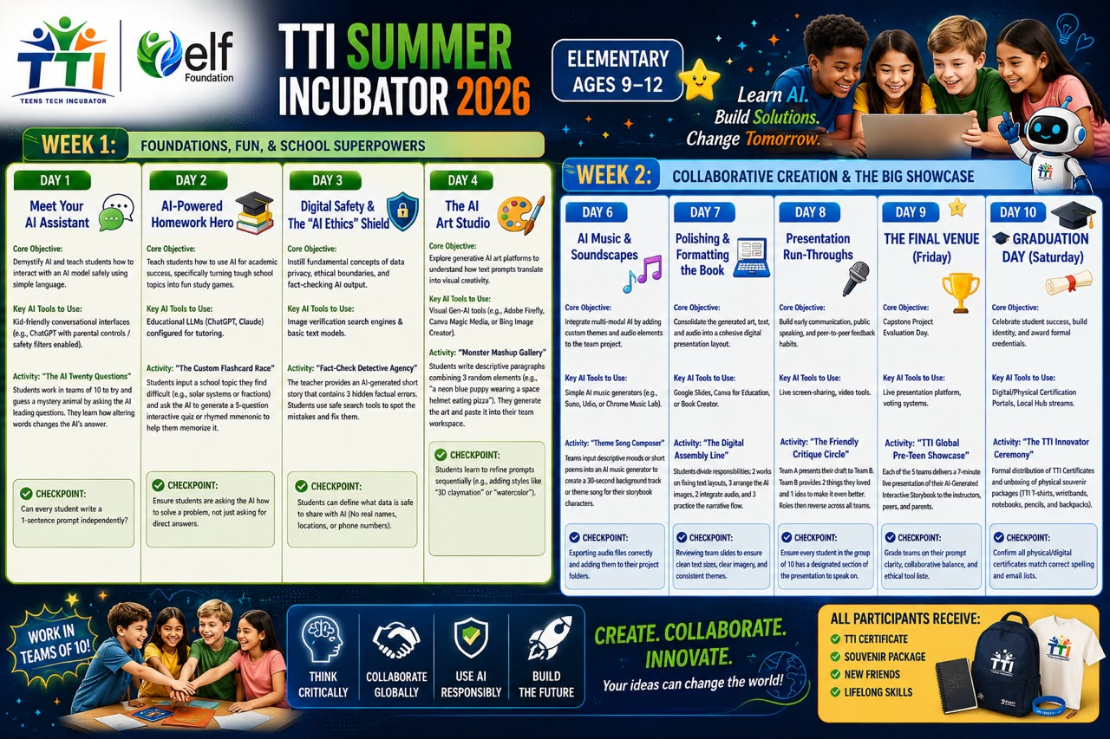
WEEK 1: FOUNDATIONS, FUN, & SCHOOL SUPERPOWERS


Day 1: Meet Your AI Assistant

Core Objective:

Demystify AI and teach students how to interact with an AI model safely using simple language.

Key AI Tools to Use:

Kid-friendly conversational interfaces (e.g., ChatGPT with parental controls / safety filters enabled).

Step-by-Step Classroom Activity:

Activity: "The AI Twenty Questions"

Students work in teams of 10 to try and guess a mystery animal by asking the AI leading questions. They learn how altering words changes the AI's answer.

Checkpoint: Can every student write a 1-sentence prompt independently?


Day 2: AI-Powered Homework Hero

Core Objective:

Teach students how to use AI for academic success, specifically turning tough school topics into fun study games.

Key AI Tools to Use:

Educational LLMs (ChatGPT, Claude) configured for tutoring.

Step-by-Step Classroom Activity:

Activity: "The Custom Flashcard Race"

Students input a school topic they find difficult (e.g., solar systems or fractions) and ask the AI to generate a 5-question interactive quiz or rhymed mnemonic to help them memorize it.

Checkpoint: Ensure students are asking the AI how to solve a problem, not just asking for direct answers.


Day 3: Digital Safety & The "AI Ethics" Shield

Core Objective:

Instill fundamental concepts of data privacy, ethical boundaries, and fact-checking AI output.

Key AI Tools to Use:

Image verification search engines & basic text models.            

Step-by-Step Classroom Activity:

Activity: "Fact-Check Detective Agency"

The teacher provides an AI-generated short story that contains 3 hidden factual errors. Students use safe search tools to spot the mistakes and fix them.

Checkpoint: Students can define what data is safe to share with AI (No real names, locations, or phone numbers).


Day 4: The AI Art Studio

Core Objective:

Explore generative AI art platforms to understand how text prompts translate into visual creativity.

Key AI Tools to Use:

Visual Gen-AI tools (e.g., Adobe Firefly, Canva Magic Media, or Bing Image Creator).

Step-by-Step Classroom Activity:

Activity: "Monster Mashup Gallery"

Students write descriptive paragraphs combining 3 random elements (e.g., "a neon blue puppy wearing a space helmet eating pizza"). They generate the art and paste it into their team workspace.

Checkpoint: Students learn to refine prompts sequentially (e.g., adding styles like "3D claymation" or "watercolor").


Day 5: Storyboarding & Team Formation

Core Objective:

Initiate the final capstone project by forming international teams and drafting a collaborative narrative.

Key AI Tools to Use:

Shared digital whiteboards (Miro / Padlet) and text tools.

Step-by-Step Classroom Activity:

Activity: "The Multiverse Interactive Story Book"

Teams of 10 choose a global or educational problem (e.g., saving the oceans). They use AI to brainstorm character profiles and map out a 3-chapter interactive storybook.

Checkpoint: Every team must leave for the weekend with an approved project outline and assigned student tasks.

WEEK 2: COLLABORATIVE CREATION & THE BIG SHOWCASE


Day 6: AI Music & Soundscapes

Core Objective:

Integrate multi-modal AI by adding custom themes and audio elements to the team project.

Key AI Tools to Use:

Simple AI music generators (e.g., Suno, Udio, or Chrome Music Lab).

Step-by-Step Classroom Activity:

Activity: "Theme Song Composer"

Teams input descriptive moods or short poems into an AI music generator to create a 30-second background track or theme song for their storybook characters.

Checkpoint: Exporting audio files correctly and adding them to their project folders.


Day 7: Polishing & Formatting the Book

Core Objective:

Consolidate the generated art, text, and audio into a cohesive digital presentation layout.

Key AI Tools to Use:

Google Slides, Canva for Education, or Book Creator.

Step-by-Step Classroom Activity:

Activity: "The Digital Assembly Line"

Students divide responsibilities: 2 works on fixing text layouts, 3 arrange the AI images, 2 integrate audio, and 3 practice the narrative flow.

Checkpoint: Reviewing team slides to ensure clean text sizes, clear imagery, and consistent themes.


Day 8: Presentation Run-Throughs

Core Objective:

Build early communication, public speaking, and peer-to-peer feedback habits.

Key AI Tools to Use:

Live screen-sharing, video tools.

Step-by-Step Classroom Activity:

Activity: "The Friendly Critique Circle"

Team A presents their draft to Team B. Team B provides 2 things they loved and 1 idea to make it even better. Roles then reverse across all teams.

Checkpoint: Ensure every student in the group of 10 has a designated section of the presentation to speak on.


Day 9: THE FINAL VENUE (Friday)

Core Objective:

Capstone Project Evaluation Day.

Key AI Tools to Use:

Live presentation platform, voting systems.

Step-by-Step Classroom Activity:

Activity: "TTI Global Pre-Teen Showcase"

Each of the 5 teams delivers a 7-minute live presentation of their AI-Generated Interactive Storybook to the instructors, peers, and parents.

Checkpoint: Grade teams on their prompt clarity, collaborative balance, and ethical tool use.


Day 10: 🎓 GRADUATION DAY (Saturday)

Core Objective:

Celebrate student success, build identity, and award formal credentials.

Key AI Tools to Use:

Digital/Physical Certification Portals, Local Hub streams.

Step-by-Step Classroom Activity:

Activity: "The TTI Innovator Ceremony"

Formal distribution of TTI Certificates and unboxing of physical souvenir packages (TTI T-shirts, wristbands, notebooks, pencils, and backpacks).

Checkpoint: Confirm all physical/digital certificates match correct spelling and email lists.